AWS Route53
Table of contents
What is a DNS?
- The Domain Name System (DNS) is a fundamental protocol on the Internet that translates human-readable domain names into machine-readable IP addresses. DNS plays a crucial role in ensuring users can access websites, send emails, and perform various online activities seamlessly.
- DNS uses hierarchical naming structure
- .com
- example.com
- api.example.com
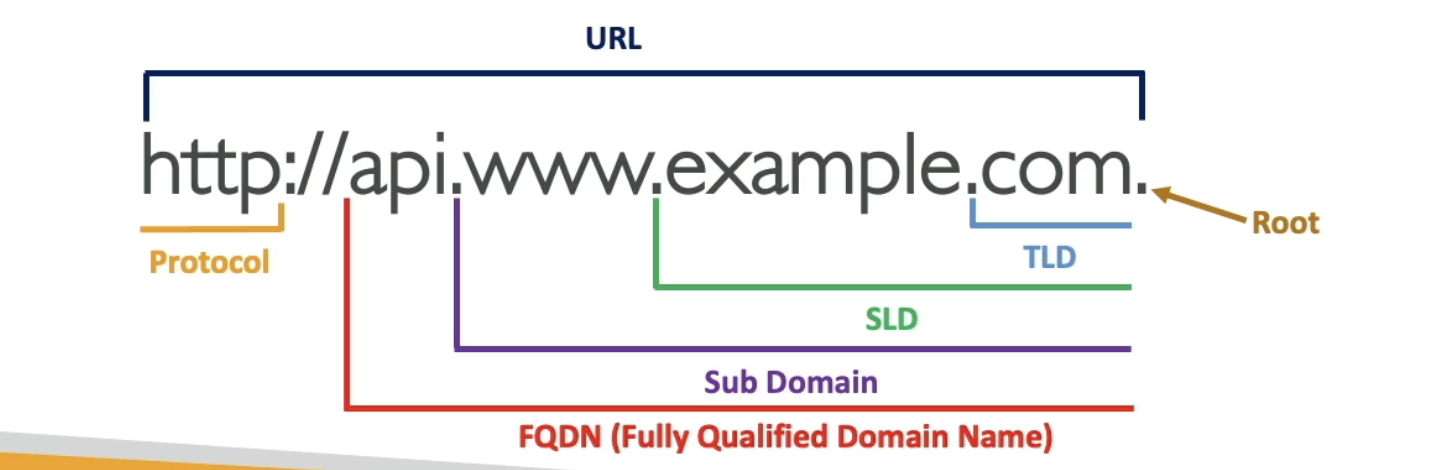
- http://api.www.example.com
DNS Terminologies
- Domain Registrar: AWS Route 53, GoDaddy, …
- DNS Records: A, AAAA, CNAME, NS, …
- Zone File: Contains DNS records
- Name Server: Resolves DNS queries (Authoritative or Non-Authoritative)
- Top Level Domain (TLD): .com, .eu, .io, .es, …
- Second Level Domain (SLD): amazon.com, cjrequena.com, google.com
AWS Route 53:
1. Overview:
- Amazon Route 53 is a scalable and highly available DNS web service.
- Used to route end-user requests to globally distributed endpoints.
- Supports domain registration, DNS routing, and health checking.
2. Key Concepts:
- Hosted Zones: Containers for DNS records, representing domains you manage.
- Record Sets: Individual DNS records within a hosted zone (e.g., A, CNAME, MX).
- Traffic Flow: Allows routing traffic based on various criteria using Route 53 Traffic Policies.
- Health Checks: Monitor the health of resources, such as EC2 instances, and route traffic accordingly.
3. DNS Record Types:
- A Record: Maps a domain to an IPv4 address.
- AAAA Record: Maps a domain to an IPv6 address.
- CNAME Record: Maps a domain to another domain (canonical name).
- MX Record: Specifies mail servers responsible for receiving email.
- TXT Record: Text record often used for verification purposes (e.g., SPF records).
- Alias Record: Allows you to map your domain to other AWS resources like S3, CloudFront, ELB, etc.
4. Routing Policies:
- Simple Routing: Maps a domain to a single resource.
- Weighted Routing: Distributes traffic based on assigned weights.
- Latency-Based Routing: Directs traffic based on the lowest latency for end-users.
- Failover Routing: Configures a primary and secondary resource for failover scenarios.
- Geolocation Routing: Routes traffic based on the geographical location of the user.
- Geoproximity
- IP-based
- Multi Value
5. Health Checks:
- Monitor the health of resources to ensure availability.
- Configure health checks for endpoints and automatically route traffic away from unhealthy resources.
6. Domain Registration:
- Register new domains directly within the Route 53 console.
- Manage existing domains and configure DNS settings.
7. Integration with Other AWS Services:
- Seamless integration with various AWS services like S3, CloudFront, ELB, and others.
- Allows for easy mapping of domains to cloud resources.
CNAME vs ALIAS
CNAME (Canonical Name) and Alias records serve similar purposes in AWS Route 53, but there are important differences between them:
CNAME Record:
- Functionality:
- A CNAME record maps one domain name to another.
- It is typically used when you want to alias one domain to another, such as www.example.com to example.com or to map a subdomain like blog.example.com to a canonical domain like www.example.com.
- Usage Limitations:
- CNAME records can only be used for non-root domain names (subdomains). They cannot be used for the apex/root domain (e.g., example.com).
- HTTP Redirects:
- When a DNS resolver encounters a CNAME record, it resolves the canonical name and then performs another DNS lookup to resolve the final destination. This can result in additional latency.
Alias Record:
- Functionality:
- An Alias record maps a domain name directly to an AWS resource, such as an Elastic Load Balancer (ELB), an Amazon S3 bucket configured as a website endpoint, an Amazon CloudFront distribution, or another AWS resource.
- It works similarly to a CNAME record but at the DNS level instead of the HTTP level.
- Usage Flexibility:
- Alias records can be used for both the root domain (apex domain) and subdomains.
- They are specifically designed for use with AWS resources and provide a more seamless and efficient mapping compared to CNAME records.
- Performance and Availability:
- Alias records are more efficient than CNAME records as they are resolved by Route 53 directly, without requiring additional DNS lookups.
- They also support features like health checks and DNS failover, making them suitable for high-availability architectures.
When to Use Each:
- Use CNAME records when aliasing one domain to another, particularly for subdomains.
- Use Alias records when aliasing a domain directly to an AWS resource, especially for the root domain (apex domain), or
- when you need better performance and integration with AWS services like ELB, S3, or CloudFront.
- Alias Records cannot be set for EC2 DNS name
AWS Route 53 Cheat Sheet:
1. Create a Hosted Zone:
- Navigate to the Route 53 console.
- Choose “Create Hosted Zone” and follow the wizard.
- Obtain the assigned nameservers for the hosted zone.
2. Create DNS Records:
- Within the hosted zone, select “Create Record Set.”
- Choose the desired record type (A, CNAME, etc.).
- Enter the necessary information and save changes.
3. Traffic Policies:
- Configure routing policies under “Traffic Management.”
- Create policies for weighted, latency-based, geolocation, or failover routing.
4. Health Checks:
- Set up health checks under “Health Checks.”
- Define the protocol, port, and endpoint for health monitoring.
5. Domain Registration:
- Register a new domain via the Route 53 console.
- Manage existing domains and update registration details.
6. Alias Records:
- Utilize alias records to map domains to AWS resources.
- Choose “Alias” when creating records for AWS services.
7. Integration with Other Services:
- Link domains to various AWS services using Alias records.